Verified 2026-09-25. Filters use public data in this browser. They do not read your save, store private notes or synchronize with Steam.
MONITORINGSave · updated 2026-09-25
Patch Notes #21 offers a potential save-load crash fix, not a confirmed cure for every save. Update and try loading the affected save again; the developer still requests examples that fail.
Safe action
Back up your saves before troubleshooting. Record whether the save is absent from the list, stalls, or crashes during loading. For a repeated load crash, use the in-game reporter or the developer's linked support channel and describe the same save and installed build.
Evidence boundary
A missing save entry is not automatically the crash addressed by #21. The historical cache workaround below is for load crashes only, not a promise to recover deleted or corrupted saves.
MONITORINGSave · updated 2026-09-25
The latest verified note, #21, cautiously targets the major crash when loading a save. #7 and #20 fixed narrower load errors earlier; do not treat any of these as proof that all startup crashes are solved.
Safe action
Let Steam complete the update, restart the game, and reproduce with the same save. Record when the crash occurs and whether another save loads. Keep a backup and submit the affected save only through the official developer support route if you choose to share it.
Evidence boundary
Crashing before the main menu, while loading a save and during play are different symptoms. No launch command, driver version or blanket folder deletion is verified here.
MONITORINGPerformance · updated 2026-09-25
Several patches optimize background work, item physics, meshes and station-area traffic. No official note promises a target FPS or universal graphics preset; continued optimization is acknowledged.
Safe action
Compare the same location, resolution and save after updating. Note whether performance falls at the station, in traffic or throughout the game. Change one available graphics option at a time and retain the setting only if your own comparison improves.
Evidence boundary
The published minimum specifications are not a 60-FPS guarantee. This guide has no measured hardware benchmark and will not invent an optimal preset or percentage gain.
MONITORINGPerformance · updated 2026-09-25
Physics, traffic and asset optimizations are relevant to uneven performance, but the notes do not establish one cause or a universal stutter fix. Treat repeated pauses separately from consistently low FPS.
Safe action
Record the trigger: entering the station, approaching traffic, handling items, or loading a save. Compare the same route after updating, and include scene and hardware details in a report. Avoid changing several settings at once if you want a useful comparison.
Evidence boundary
No source here identifies shader compilation as the cause of every pause. The developer's historical load-crash cache workaround is not a verified general stutter remedy.
OFFICIALLY FIXEDPerformance · updated 2026-09-25
Patch #19 re-enabled DLSS while preventing unsupported graphics cards from enabling it. An unavailable option on unsupported hardware is a compatibility restriction, not evidence that the restored feature is broken.
Safe action
Update first, inspect the game's available upscaling options and confirm your card supports the selected technology. Apply the option and compare in the same scene. Report a supported-card failure with the card model and the exact menu behavior.
Evidence boundary
The notes do not list every supported GPU or promise an FPS gain. Do not force an unavailable option through unverified configuration edits.
OFFICIALLY FIXEDPerformance · updated 2026-09-25
FSR was temporarily disabled in #18 after crash reports and restored in #19. Advice that it is still globally disabled is outdated for the latest verified patch sequence.
Safe action
Complete the update and check the upscaling menu again. If enabling FSR reproduces a crash, record the GPU, setting, save and scene and submit a fresh report. You can compare behavior with the option off without deleting progress.
Evidence boundary
Re-enabling FSR is an official change, not proof that every hardware configuration is crash-free. Do not describe #18's temporary restriction as current behavior.
OFFICIALLY FIXEDArmory · updated 2026-09-25
Patch #6 addressed weapons not registering in the Armory container. Patch #15 separately corrected the Supply & Demand handcuff objective and handcuff-board placement mode. These are not the same as gear duplication.
Safe action
Identify whether the container count fails, the mission objective remains incomplete, or placement mode is unavailable. Update and retry only the corresponding interaction. Note the item type and board or container involved when reporting a recurrence.
Evidence boundary
Do not remove all equipment or restart the save as a default fix. The notes establish specific registration and handcuff corrections, not a complete armory unlock guide.
OFFICIALLY FIXEDArmory · updated 2026-09-25
#14 addressed mass armory duplication and introduced player Trash Bin cleanup for duplicate pistols, shotguns and handcuffs. #18 corrected a Trash Can gun-deletion trigger; #19 corrected handcuffs duplicating after prison transport calls.
Safe action
Update before cleaning duplicates. Keep a backup and distinguish surplus items from equipment you need. Use the developer-documented player Trash Bin option for duplicates only, or seek help through the official support link if your save is overwhelmed.
Evidence boundary
These are three distinct triggers and a cleanup option, not permission to assume every duplicated item in an old save disappears automatically. No money exploit is recommended.
OFFICIALLY FIXEDPatrol · updated 2026-09-25
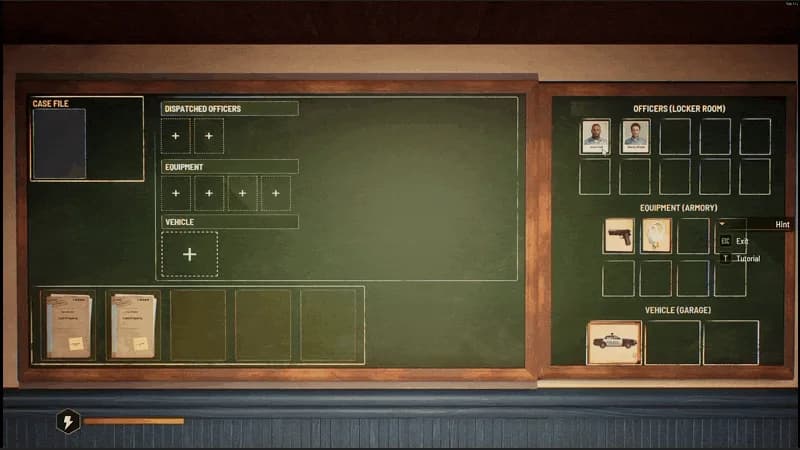
Patrol vehicle recovery changed repeatedly: #16 addressed vehicles stuck after patrols, and #17 addressed missing returned vehicles plus a garage-return failsafe for future blockages. A ghost assignment is a separate issue.
Safe action
Check whether the car is blocked in the world, has returned but is absent from the Briefing Board, or belongs to an empty patrol. Record its assignment and location. Update and inspect the garage and board before issuing another dispatch.
Evidence boundary
The #13 near-garage workaround was limited in scope. Neither it nor the newer failsafe guarantees recovery of every previously affected save.
OFFICIALLY FIXEDStaff · updated 2026-09-25
The official record distinguishes ignored case shelves (#4), workers stranded after shifts (#9), paperwork/device interactions (#16), and shelf-facing/placement improvements (#18). Match the symptom before choosing a next step.
Safe action
Check the worker's role, active assignment and device access direction. Compare a filled shelf being ignored with an employee unable to reach the fax or shredder. Use the placement direction indicator introduced in #18 when arranging those devices.
Evidence boundary
No source proves every idle employee is bugged, or that one staffing layout is universally optimal. Avoid deleting the room or employee without a backup and a specific reason.
OFFICIALLY FIXEDStaff · updated 2026-09-25
#8 corrected idle officers restored inside vehicles, #16 improved working behavior, #18 improved paper-shelf interactions, and #20 corrected garage navigation through cars. The location determines which correction is relevant.
Safe action
Record whether the officer is in a vehicle, in the garage or trying to reach station equipment. Review assignment and access space, update, then retry the same task. Include a screenshot of the obstructed path in a report.
Evidence boundary
Officer movement problems are not interchangeable with a dispatch that exists without officers. See the dispatch-map issue for that unresolved older-save boundary.
OFFICIALLY FIXEDCases · updated 2026-09-25
Patch #7 explicitly addressed the Incorrect Case error in Holding Cells. This fix concerns that processing error, not a promise that any arbitrary file will be accepted for any prisoner.
Safe action
Update, identify the prisoner and associated case, and retry the holding-cell task shown by the game. Record the exact message and file stage if it repeats. Keep a screenshot before moving or discarding related paperwork.
Evidence boundary
The note does not publish a universal case-answer key or override genuine mismatches between records. This guide does not tell you to bypass evidence checks.
OFFICIALLY FIXEDCases · updated 2026-09-25
#10 corrected expanded-case board placement and pickup when using a Documents Box. #14 addressed detective workstation files; #18 addressed rare file-cabinet pickup failures. Identify the surface rather than treating every case interaction as one bug.
Safe action
Note whether the failure occurs at the detective workstation, cabinet, or Briefing Board and whether you are using a Documents Box. Match the objective on screen, update and retry that interaction. Preserve the file instead of disposing of it.
Evidence boundary
A board that lacks a valid prepared case is not automatically affected by the Documents Box bug. No generic reset command or guaranteed puzzle solution is established.
OFFICIALLY FIXEDCases · updated 2026-09-25
#8 corrected taking an expanded case to the Briefing Room through a Documents Box. #10 separately corrected picking up and placing an expanded case on the board through that box.
Safe action
Read the exact active objective: transport, pick up and place on board are different checkpoints. After updating, retry the appropriate box interaction and compare the objective state. Include the file stage and interaction sequence in a report.
Evidence boundary
The fixes do not say a Documents Box solves or closes a case by itself. They address objective recognition while handling an already expanded case.
WORKAROUNDTraffic · updated 2026-09-25
Patch #12 added a Reset Traffic button in the pause menu. Earlier #4 addressed traffic stopping on small objects, while #17 optimized traffic around the station. Resetting traffic is a recovery tool, not proof every cause is fixed.
Safe action
If traffic is blocked, pause and use the in-game traffic reset introduced in #12. Observe whether the same obstruction returns and record its location. For a dispatched police car, also inspect the patrol-specific issue instead of repeatedly resetting traffic.
Evidence boundary
No source states that traffic reset repairs saves, returns every police unit, or resets cases. Its exact effects on unrelated tasks are not invented here.
OFFICIALLY FIXEDUI · updated 2026-09-25
The patches cover different interaction faults: incorrect activation (#2), rare blocked interactions after loading (#5), missing station-NPC interactions after leaving and returning (#7), and labels on nonfunctional objects (#13).
Safe action
Identify the target, prompt and action before retrying. Record whether the prompt is absent, disabled or triggers the wrong action, and whether loading or leaving the station preceded it. Update and repeat that specific sequence.
Evidence boundary
A removed prompt on a nonfunctional object can be intentional. No patch here establishes a universal keybinding fix or that every resident must offer every action.
OFFICIALLY FIXEDStation · updated 2026-09-25
Holding Cells have separate fixes for incorrect cases (#7), workplace strength (#8), player lock-ins (#11), and tutorial objective-marker location (#20). #11 says getting trapped is harder, not impossible in all circumstances.
Safe action
First classify the failure as paperwork, assignment, movement or tutorial guidance. Compare the corresponding patch and retry after updating. If physically trapped, preserve the save and report the cell and movement sequence instead of deleting progress.
Evidence boundary
These notes do not publish cell capacity, prisoner timers or an escape shortcut. A marker change is not a new prisoner-processing requirement.
OFFICIALLY FIXEDVehicles · updated 2026-09-25
#5 addressed NPCs blocking the police van after leaving Holding Cells. #13 corrected inappropriate prison-bus infractions, and #19 corrected a separate handcuff-duplication trigger after calling transport.
Safe action
Check whether people obstruct the van's path or the transport interaction itself fails. Record the cell exit and vehicle location. Update and retry the same transfer before treating every delay as a van-navigation regression.
Evidence boundary
These corrections do not verify a transport timer or guarantee that every old dispatch blockage is removed. Do not infer vehicle ownership or unlock conditions from them.
OFFICIALLY FIXEDStation · updated 2026-09-25
#5 addressed electricity demand stacking over time and creating overloads. #1 concerned station reopening after power returned; #14 corrected the inability to place more than one UPS. Capacity and restoration remain different topics.
Safe action
Check whether the station lacks power, reports excessive demand or stays closed after restoration. Review installed equipment and transformer/UPS context, then compare the matching patch. Keep a record of displayed demand before and after the failure.
Evidence boundary
No numerical wattage, UPS runtime or free upgrade is established by these fixes. A real capacity limit is not disproved by the stacking-bug correction.
OFFICIALLY FIXEDStaff · updated 2026-09-25
The board's zoom, locked-officer icons and floating files were addressed in #6; stat icons changed in #7/#8. #20 corrected the board appearing locked when it should be available.
Safe action
Determine whether the entire board is locked, a worker is unavailable, the zoom fails or an icon is wrong. Update and retry the affected view. Check actual staff availability instead of relying solely on a stale icon.
Evidence boundary
A UI correction does not make every employee eligible for every role. The patches do not supply an efficiency formula or best staffing ratio.
OFFICIALLY FIXEDUI · updated 2026-09-25
#6 corrected options being lost when switching tabs; #10 addressed additional menu conditions that prevented changes from saving. Retest persistence rather than assuming a visible setting was stored.
Safe action
Change one option, use the menu's available confirmation control, leave the tab and reopen it. Then restart normally and check again. Record whether the value resets on tab switch, menu exit or relaunch.
Evidence boundary
No source identifies a universal settings-file permission fix. Do not delete the entire Saved folder to test menu persistence.
OFFICIALLY FIXEDUI · updated 2026-09-25
#2 corrected map zoom; #6 separately corrected zoom on the Worker Assignment Board. The map view and board are distinct, so a report should name which one fails.
Safe action
Open the affected view after updating and retry the input shown by the current game. Record the view, input device and whether other map actions respond. Do not assume a keyboard shortcut from another edition applies.
Evidence boundary
The notes do not publish a complete map-control scheme or prove every input-device issue shares the same cause.
MONITORINGPatrol · updated 2026-09-25
#20 addresses new ghost-patrol occurrences but explicitly says existing affected saves still need cleanup. Earlier map text, empty dispatch and returned-vehicle fixes do not establish that an old ghost assignment is repaired.
Safe action
Record the case, assigned officers, equipment and vehicle shown on the Briefing Board and map. Distinguish an empty patrol from a missing returned car. Update, preserve the save and report an existing ghost assignment with its context.
Evidence boundary
Do not relabel existing ghost patrols OFFICIALLY FIXED from the prevention claim. No destructive save edit or force-complete command is verified.
OFFICIALLY FIXEDUI · updated 2026-09-25
#9 corrected the player respawning clipped into a wall at the Clinic. The note is location-specific and does not claim to repair every collision or out-of-bounds situation.
Safe action
Update and record whether the failure occurs immediately after a Clinic respawn. Include the location and preceding event in a report. Keep a save backup rather than experimenting with unverified teleport or console commands.
Evidence boundary
There is no official recovery key or exact respawn coordinate in the note. A different stuck location needs its own evidence.
OFFICIALLY FIXEDUI · updated 2026-09-25
#9 corrected the XP bar being displayed incorrectly in several menus. It documents a visualization fix, not new reward values or a universal solution to progression that has actually stopped.
Safe action
Compare the same progress value in the affected menus after updating. Record which screen differs and whether the discrepancy is only visual. Include the task completed and the displayed values in a report.
Evidence boundary
Do not infer lost XP, changed payouts or station-level thresholds from a display-only patch entry. Exact progression formulas remain unverified.